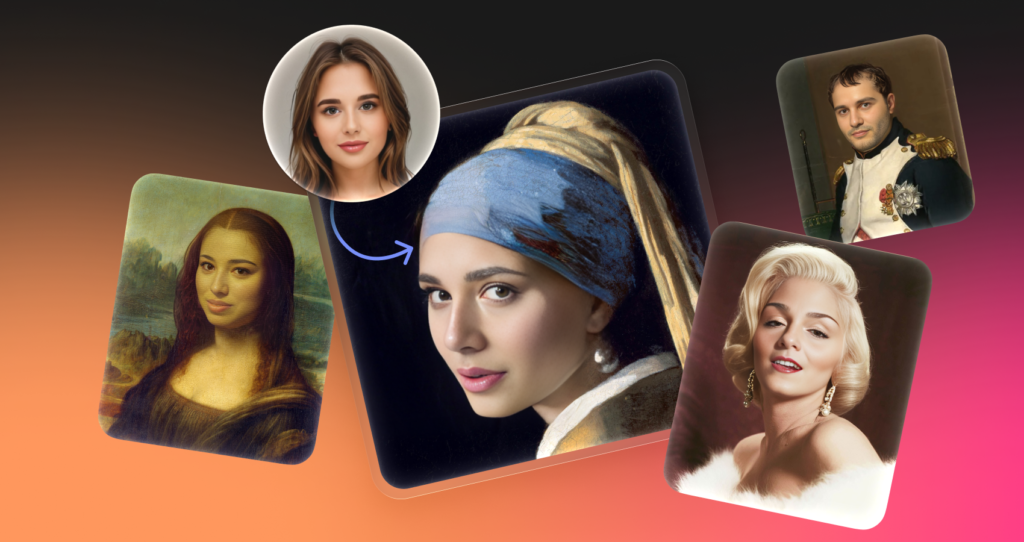

Most debates about AI image manipulation hit two extremes. Fear of deepfakes dominates the headlines, or skeptics dismiss the technology as a gimmick. For creative professionals, the reality is boringly practical. We need to adjust imagery to fit a specific narrative or demographic without organizing an expensive reshoot.
Icons8’s Face Swapper occupies this functional middle ground. It isn’t a tool for generating fake news; it serves as a utility for designers, marketers, and developers who need to iterate on visual assets quickly. The central question for anyone adopting this workflow is straightforward: How do we use this responsibly without crossing ethical lines or sacrificing image fidelity?
The Mechanics of Identity Replacement
Forget simple overlay apps that paste a flat mask onto a head. To understand where this tool fits, look at the underlying mechanics. It generates a new facial structure that sits “in between” the source and the target.
Upload a source image and select a target face. The software scans the lighting, skin texture, and angle of the original photo. It then synthesizes a new face that retains the expression and environmental context of the base image but adopts the features of the target. This distinction matters. You aren’t just pasting a celebrity’s face onto a stock model. You are creating a synthetic identity that resembles both inputs but is distinct from either. This “hybrid” generation helps navigate the gray areas of model likeness and anonymity.
Workflow: The Localized Marketing Campaign
Stock photography has a homogeneity problem. You might find the perfect photo of a team collaborating-great lighting, perfect composition, authentic body language-but the demographic representation misses the mark for your specific region.
Manual editing here is a dead end. You either settle for a worse photo or burn budget on a custom shoot.
Face Swapper lets a marketing manager take that high-quality group photo and adjust the representation. The tool handles multiswap natively, detecting all faces in a group shot. Select specific individuals in the frame and swap their faces with models that better reflect the target audience.
Lighting remains consistent. If the office scene has cool, overhead fluorescent lighting, the swapped faces adapt to that color temperature. Brands can then use a single high-quality asset across multiple regional campaigns without the imagery feeling foreign. Transparency acts as the ethical guardrail here: the goal is representation in generic marketing materials, not misrepresenting real-world individuals.
Workflow: Anonymizing Case Studies
Portfolios present a legal minefield for photographers and designers. You capture a perfect user reaction or a technique demonstration, but you lack the model release to publish that specific person’s likeness.
Blurring faces ruins the aesthetic. Black bars look criminal.
A practical workflow involves using Face Swapper to alter the subject’s identity just enough to break recognition. Swap the subject’s face with a generated AI face or a dissimilar stock model. You preserve the human element-the eyes, the smile, the engagement-while rendering the actual individual unrecognizable.
This proves particularly useful for “Before/After” dental or cosmetic case studies where the client wants privacy. It also solves problems for UX personas where you need a realistic face that doesn’t belong to a real person who could be identified.
A Day in the Life: The UI Mockup
Take a routine task to see how this fits a daily schedule.
Jules is a UI designer building a high-fidelity mockup for a client’s team directory page. Real employee photos trigger privacy headaches, but using the same three “smiling business man” stock photos looks amateurish.
- Sourcing:Jules grabs a folder of diverse, high-quality portraits from a royalty-free site. Lighting is good, but the faces are too recognizable as famous stock models.
- The Swap:They open Face Swapper in the browser and drag in the first portrait.
- Selection:Instead of uploading a specific face, Jules picks from the tool’s built-in library of AI-generated faces. This ensures the result won’t accidentally look like a celebrity or a competitor’s CEO.
- Processing:The swap takes a few moments. The result is a 1024px image-high enough resolution for the web mockup without needing immediate upscaling.
- Refinement:One photo has a subject with tricky hair. The swap looks good, but the skin texture is slightly off. Jules re-uploads the result and swaps it with itself. This acts as a “skin beautifier,” smoothing out artifacts.
- Hand-off:Jules downloads the set. The client sees a realistic team page with unique faces that don’t carry legal baggage.
Comparison: Where does it fit?
Face manipulation tools generally fall into three buckets.
Manual Compositing (Photoshop):
This is the purist’s route. You have total control over masking, color grading, and blending. But convincing swaps take anywhere from 30 minutes to several hours depending on hair complexity. It fails the scalability test for slide decks or mockups.
Mobile Entertainment Apps (Reface, etc.):
These apps prioritize memes. They are fast and fun, but output resolution is usually low and often watermarked. Facial blending favors comedy over realism, and they rarely handle group photos effectively.
Face Swapper:
This tool targets the professional middle. It offers a higher output resolution (1024×1024 px) than most automated alternatives. Batch processing works natively. While it lacks the pixel-perfect control of Photoshop, it offers a 90% solution in seconds rather than hours.
For those looking to integrate face swap technology into a professional pipeline, resolution is the deciding factor. A 512px output-common in other AI tools-looks muddy on a retina display. The 1024px standard provided here is the baseline for usable web assets.
Limitations and when this tool is not the best choice
Marketing claims often promise magic, but real-world testing reveals specific weak points. The AI generates the face “in-between” source and target.
Obscured Faces:
Glasses, face masks, or hands covering the chin confuse the algorithm. It often attempts to “paint” the face over the obstruction or blend the object into the skin. The result looks like a horror movie artifact.
Extreme Angles:
Documentation notes that the tool struggles with 3/4 head positions. Front-facing and slight side profiles work well. Steep profile shots-where only one ear and eye are visible-often fail to map correctly. The AI tries to wrap a frontal face onto a side profile, flattening the depth.
Batch Volume:
Browser-based interfaces choke on massive volume. If you need to swap 5,000 frames for a video sequence, performance degrades. Use the API for those loads.
Practical Tips for Realistic Results
Treat the software as a camera, not a magic wand.
Match the Head Shape:
The AI adapts features but cannot change the fundamental geometry of the skull. Swapping a wide, square-jawed face onto a narrow, pointed-chin subject creates uncanny results. Match the general face shape of the source and target for believable output.
Check the History Tab:
Images stay secure for 30 days. View your history and re-download results without incurring GPU costs again. This saves you if you accidentally close a tab. Note that for privacy, the system permanently deletes images after two months.
The “Beautifier” Hack:
As mentioned earlier, if a result looks rough, upload the result as the source and swap it with its own face again. This second pass acts as a smoothing filter, cleaning up skin inconsistencies.
Upscaling Integration:
Print work often demands more than 1024px. Don’t rely on the swapper alone. Run the swap first, then push it to the Smart Upscaler. Doing it in reverse usually yields worse results because the AI has to guess more details during the swap.
Master these constraints, and Face Swapper becomes a viable asset for rapid, ethical visual production.